What are Executable Files ?

Let's understand more about what executable files are and how you can create them. What is the purpose of these executable files?
There are two types of executable files:
Script Executable File Binary Executable File You can create any file and write anything in it, but it will only be treated as an executable file if it's properly formatted for execution.
For example, in VS Code, if you create a file called hello.txt and write "hello" inside, it won't automatically run as an executable. However, in the terminal, if you type ./hello.txt, the system will try to execute it, assuming you’ve given the necessary permissions.
The term ".exe" refers specifically to Windows executable files, but other systems like Linux or macOS have different formats for executable files.
🕑 12:08  heyashu //wsl.localhost/Ubuntu/learning
🚀  ./hello.txt
./hello.txt: line 1: hello: command not found
🕑 12:29  heyashu //wsl.localhost/Ubuntu/learning
🚀
Now, if you write the ls command in the hello.txt file, which is a valid command, and then execute the file using ./hello.txt, it will list all the files in that directory (assuming you have made the file executable and are using a Unix-based system like Linux or macOS).
🕑 12:29  heyashu //wsl.localhost/Ubuntu/learning
🚀  ./hello.txt
app.js  hello.txt
🕑 12:30  heyashu //wsl.localhost/Ubuntu/learning
🚀
So, this hello.txt is treated as an executable file, specifically a script executable file.
Note that in Windows, whatever file you create can potentially be treated as an executable file, regardless of its extension or even if it has no extension. Remember, a script file does not necessarily need to have a .js extension; it can be anything.
However, a confusion arises—since all files can potentially be treated as executable files in Windows, to avoid this, we use the .sh extension for better visibility. Files with this extension are referred to as bash script files.
There are two common types of script files:
.sh files are used for Linux-based systems. .bat files are used for Windows systems. Everything we've discussed so far applies mainly to Windows. However, if you try the same thing in Linux, or in Windows using the Windows Subsystem for Linux (WSL), you may encounter an error like "Permission denied". This is because Linux systems require explicit permissions to execute files. How to install WSL
root@DESKTOP-NCVPMH3:/learning# ./hello.txt
-bash: ./hello.txt: Permission denied
root@DESKTOP-NCVPMH3:/learning#
To grant the Permission
chmod +x hello.txt
After this
root@DESKTOP-NCVPMH3:/learning# ./hello.txt
abc.sh  app.js  hello.txt
Binary Executable File
You have seen .exe file extensions. Now, if you try to open any .exe file in VS Code, you can't open it unless you either download an extension or open it in a text editor. Basically, just know that .exe files do not have text written inside. Instead, these are binary files.
You can copy-paste the absolute path and run it, just like you would run hello.txt.
So, we are just telling you both file types can be run here.
What is Binary?
A binary file is a file that is written in 0s and 1s (machine code), so it is not readable like a text file. What is binary
Can We Create .exe Files / Binary Files?
Yes, we can create binary files and app-like things using Node.js. Here is one example:
Create a package.json file and paste this code. We are going to see a timer example, and in the end, you will get a timer.exe.
{
  "name": "timer",
  "bin": "app.js",
  "scripts": {
    "build": "pkg -t node16-win-x64 ."
  },
  "devDependencies": {
    "pkg": "^5.8.1"
  }
}
and create an app.js and paste this
let time = 1;
console.log('Hello, I am ProCodrr.');
setInterval(() => {
  console.log(time++);
}, 1000);
and then do
npm i
and then
npm run build
and then timer.exe will be created for you
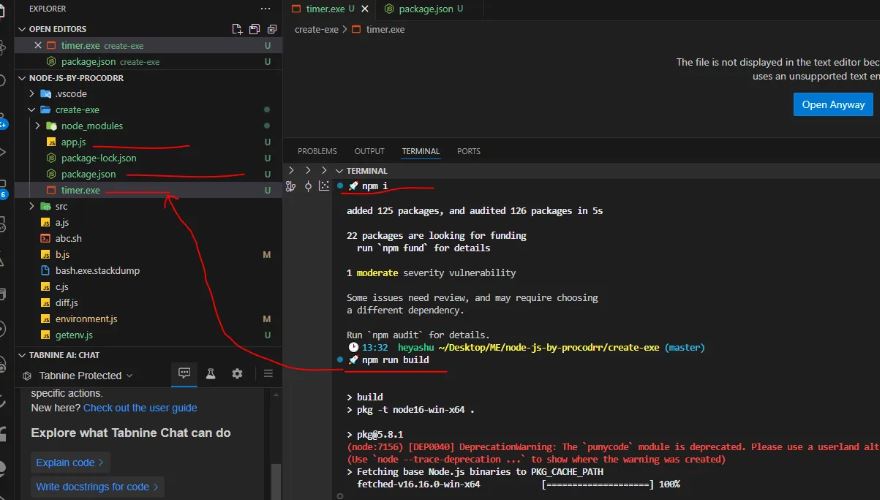
Now, if you click timer.exe, which is a binary executable file, double-clicking it will start the timer as written in the app (timer.js). Just open your timer.exe after revealing it in File Explorer.
Hello, I am ProCodrr.
1
2
3
4
5
6
For creating this, pkg is a dependency that is used.
You can check the pkg command and learn many things from it.
Now, is there any .exe file that exists in WSL or Linux systems? Yes, but not with the .exe extension. .exe only exists in Windows operating systems. In WSL or Linux, you can check the /bin folder and run the listed executable files inside bin.
Want me to write notes on a course?
Tell me the course, book, or research topic you want covered. If it helps learners, I'll consider adding structured digital notes for it in the garden.
Have a notes collection to feature here?
Do you have open notes you want featured in this digital garden? Let me know — we can collaborate and publish them for learners worldwide.
Having a doubt? Ask a query?