
So we have screens developed using AI, like a SaaS page where we propose what we do, and a dedicated landing page of our wedding, and then we have one page where we show the dashboard.
And next, we will keep growing with auth pages.
But how?
As we discussed, we will build the project using AI. And to do that, you can use VS Code and install the Codex extension, or search online for other tools. It is very easy to set up. There are many.
In VS Code, or whatever you will use, you need to have Node.js in your system, and Git and all.
I don’t think you will be starting from 0. You already know and you have Node.js and Git installed. If not, please install Node.js and Git. These are two software files you need to download and install.
As a code editor, I will be using a different IDE to showcase to you, but I will start with Cursor because I have a subscription to Cursor.
Okay, Step 0 is to initialize a repo on GitHub.
Why GitHub?
GitHub is a place where we put our code so that it will be visible to all.
So set up all and then proceed with code.
Else, you can ask AI to do it for you if you have an AI editor.
I have initialized this GitHub repository for this project. You can find the repo here:
Easy Marriage Planner — GitHub Repository
So this is the place where we will push our code.
So if I summarize the steps:
⇒ Install VS Code / any AI editor
⇒ Install the extension if your model needs that, or use your AI editor directly
⇒ Create a GitHub account
⇒ Initialize a new repo
⇒ Clone the repo or push your code to the repo
⇒ Open the repo in your editor
Basically, you code in your editor, and it will be linked with GitHub via Git.
Git is a version control tool. Using Git, you can save and manage your code changes and push your code to GitHub.
There are other companies that provide code-hosting platforms as well, like GitHub, Bitbucket, etc.
So set everything up, and then we can start coding.
Starting the Development
So as you know, we already have 4 documents, correct? Read the last notes, else let me put them here.
So we have PRD, System Design Document, API Document, and Database Design Document. We will put all of them in the repo, I mean, in our editor.
We will create a folder called docs and put all the documents there.
Refer to the screenshot below.
Make My Marriage System Design
Make_My_Marriage_Database_Design
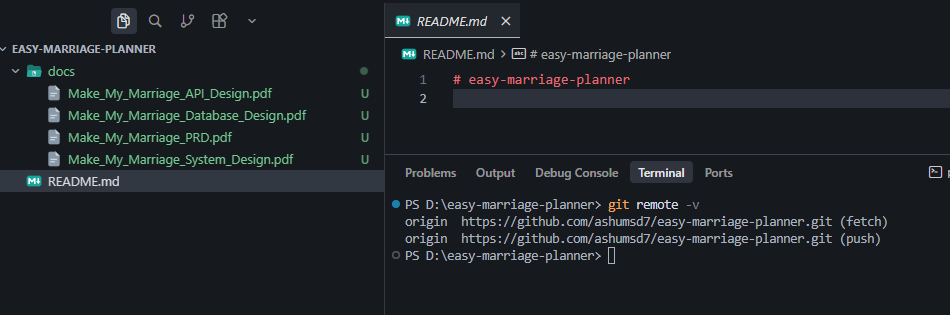
As you can see, our IDE is ready with my GitHub via Git, and in docs, every document is mentioned. We are ready to ask AI to code.
Okay, but we will not ask everything at once. We will do scaffolding first.
What is Scaffolding?
In software development, scaffolding is an automated technique that quickly creates the basic skeleton, folder layout, and starting code for a new project or feature. [1, 2]
Just like physical metal scaffolding supports a building while workers construct it, software scaffolding supports a developer by handling the boring, repetitive setup work.
So let’s ask ChatGPT to prepare a prompt for proper scaffolding.
I have 4 documents, and I will give them to ChatGPT and ask it to give me a proper prompt, so that I can bring that prompt to my IDE and my IDE can do the scaffolding.
Chatgpt given me this
You are the lead software architect for this project.We are building:MAKE MY MARRIAGEA wedding planning and management SaaS.I have already prepared project documentation in this repository…. and so much lines
But now I will ask my IDE to understand the documents I included and all. I will not ask it to build anything.
Read the scaffolding — it means not installing everything, but preparing a folder structure based on the documents.
So let me ask my IDE to understand the files we added instead of starting development.
So my IDE replied this:
I'll read all four docs and summarize the full picture.The Database PDF came through as binary. Searching for all four docs and extracting their text.System Design and API Design extract cleanly. Reading those fully and retrying Database Design.I've read
PRD
,
System Design
, and
API Design
in full.
Database Design
is a compressed PDF (ReportLab binary streams), so field-level schemas from that file couldn't be extracted as text — collection inventory below comes from System Design §3, which should align with it.
My IDE has already planned the folder structure.
I will ask my IDE to start scaffolding, but you can ask it so many questions before coding through ChatGPT.
There is no best or perfect folder structure, but we need to follow the standard that many people use, because sometimes other people also see and learn from your code.
For example, I have pasted some fraction of that…
make-my-marriage/
├── frontend/ ├── backend/ ├── docs/ ├── .gitignore ├── .env.example ├── docker-compose.yml ├── README.md
So after some minutes, your IDE will create a dummy, live, working application for you.
It might give me heavy code, and no need to review. You can review, but reviewing everything, the answer is no.
There is one concept called the Maker-Checker concept.
Maker-checker
Maker-checker in AI software development is a security and governance control pattern where the entity that generates code, proposes infrastructure changes, or executes tool calls (the "maker") is strictly separated from the entity that validates and approves them
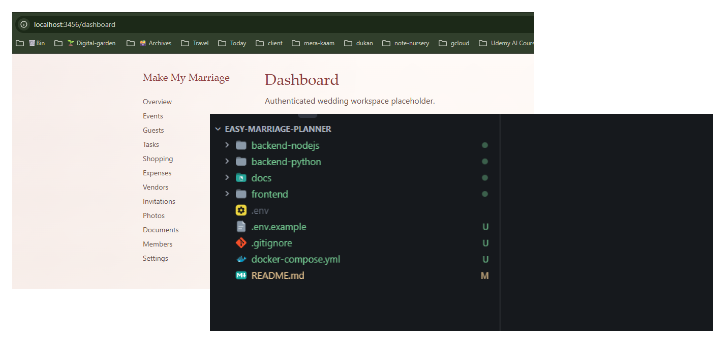
So after waiting a few minutes, it is running on localhost, and the scaffolding I created is working. It also created folders for the backend and frontend.
I will try to build the backend in Python and Node.js both. Let’s see how it goes.
If you want to contribute, please contribute to the repo. I have also pushed the code, and the GitHub repo is updated below.
Easy Marriage Planner — GitHub Repository
Now you can review your code if you want, and do whatever you want. Later, we will start adding these things.
See you later. Bye-bye! 👋